
Together against payment fraud
Online payments are safer today than ever, thanks to the continuous efforts of banks and payment partners such as Bancontact. But fraudsters no longer focus on the systems; they target people. The better you understand how they work, the easier it becomes to recognise and avoid a fraud attempt.
That is why you will find practical tips on this page for making secure digital payments.
What you need to know about payment fraud
Behind many forms of online fraud are organized criminal networks that continuously develop new fraud methods. Some even operate from purpose-built scam centres where teams work daily to find new ways to deceive people. With artificial intelligence (AI), these attempts are becoming increasingly convincing.
Criminals can write believable messages, create realistic websites, and even mimic voices, making fraud difficult to spot at times. Anyone can become a victim. Fraud is not about carelessness, but about criminals investing significant time and resources to gain trust and put people under pressure.

What we do to protect you
Fraud can never be completely ruled out, but we do everything possible to stay one step ahead of criminals. That is why we invest in the security of our payment solutions. Together with banks, payment partners, and merchants, we are building a secure payment environment. We do this through:
📱 Secure payment solutions
We continuously update our app to combat fraud. In addition, when you scan a QR code with the Bancontact Pay app, you are always in a secure environment, ensuring you only pay merchants known to us.
🏦 Close collaboration with banks
We are part of a Belgian network against fraud. As soon as banks discover new fraud tactics, they share them with us. By constantly sharing information, we stay ahead of fraudsters together.
👩🏽🔧 Monitoring and security
Our experts continuously monitor all payments in the app. This allows us to spot suspicious behaviour immediately and stop fraudsters before anything goes wrong.
🤝🏽 Strong partnerships
We collaborate with specialized partners such as Telesign and itsme®. Thanks to these partnerships, your account and payments receive extra protection.
Protect yourself in 6 steps
Scammers primarily try to gain your trust and rush you into taking action. With these six simple habits, you will make things much harder for them.
1️⃣ Take your time before clicking
Do not let urgent messages rush you. In doubt? Open the official app or website yourself instead of clicking on a link.
2️⃣ Check the sender
Fraudulent messages often look real. Pay attention to spelling errors, unusual sender addresses, and altered URLs. The padlock icon and https:// alone are not enough.
3️⃣ Never share your codes or sensitive details
A bank or official authority will never ask for your PIN, password, or banking details via email, phone, or chat. Perform sensitive actions only within the official app.
4️⃣ Never confirm anything at the request of others
Only approve actions that you initiated yourself. If someone calls asking you to approve a code or an itsme® notification, never do it. Our employees will never ask for this.
5️⃣ Protect your accounts and devices
Choose strong, unique passwords and enable two-step verification (extra security via an SMS or email code). Update your devices regularly and only use official app stores.
6️⃣ Stay in a trusted payment environment
Only confirm payments in your own banking app or the Bancontact Pay app. Never manage your finances over public Wi-Fi.
AI is making fraud increasingly believable. New technology makes it easier to create convincing messages, websites, images, and even voices. Therefore, it is becoming increasingly important not just to look at how something appears, but to remain critical and ask: am I expecting this message or request?
If you suspect fraud, act quickly:
- Block your card and report the fraud via Fraudstop.
- Report suspicious messages to suspicious@safeonweb.be.
- File a report at your nearest police station.
FAQ about fraud and security
How do I recognize a fake invoice?
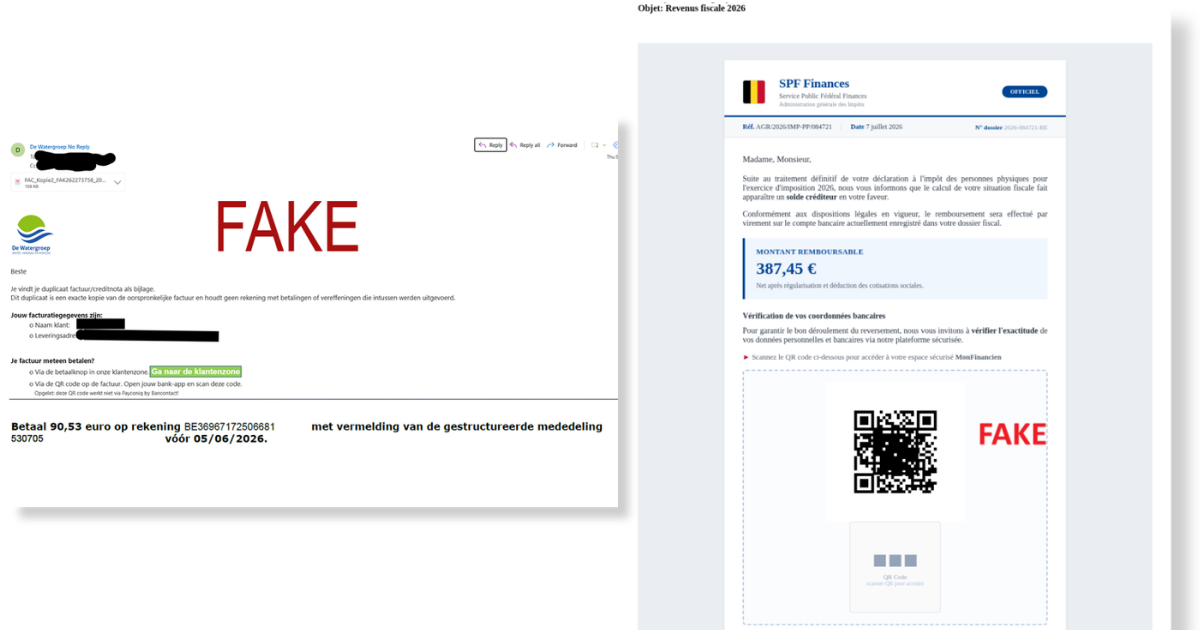
Source: Safeonweb
Pay special attention to:
- Unexpected invoices, e.g. strange timing or sender;
- Time pressure, e.g. 'final reminder' or a very short payment deadline;
- Strange details, e.g. email address or links;
- Requests for information that is normally never requested.
Tip 🔦
In doubt about an invoice? Do not just pay it. Contact the company directly via their official website or app. Never use the contact details listed on the invoice itself.
Tip 🔦 🔦
Activate the 'Invoices' feature in the Bancontact Pay app to receive and pay your invoices directly within your app going forward. Only trusted companies or organizations can send invoices through this channel.
How do I recognize a phishing SMS or email?
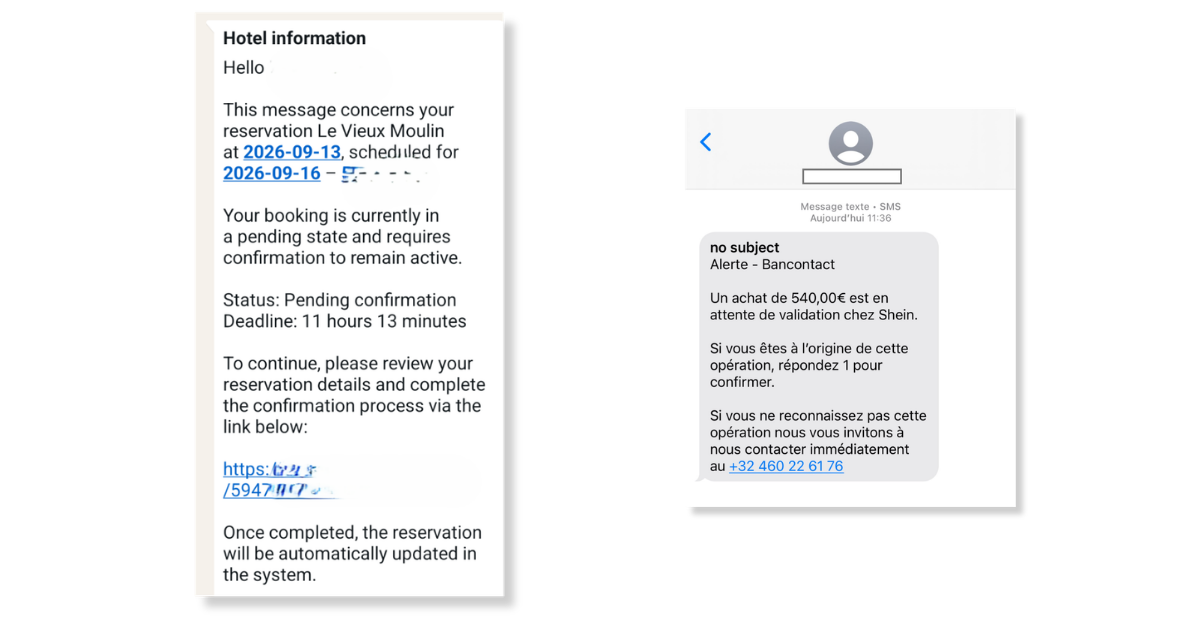
Source: Safeonweb
Pay special attention to:
- Unexpected timing, e.g. a message about a package from Bpost when you haven't ordered anything; winning a prize when you never entered a contest;
- Insistent language, e.g. 'urgent' or 'last chance';
- Strange details, e.g. email address or links;
- Requests for personal data, banking details, or to approve an action via itsme® or SMS codes;
- Illogical payment instructions, e.g. making a small payment to receive money, entering payment details on an unfamiliar web page.
Tip 🔦
In doubt about the authenticity of a message? Ignore it and contact the company or organization directly through official channels (website, app, etc.).
How do I recognize a fake phone call?
Pay special attention to:
- An unexpected phone call, e.g. your bank calling regarding a "security issue";
- Requests for your codes or banking details, or to approve an action via itsme® or your banking app;
- Pressure to act immediately;
- Being asked to make a transfer to keep your money "safe";
- Being asked to download something for security, e.g. a telecom or IT provider claiming there is a virus on your computer and you need antivirus software.
Tip 🔦
At the slightest doubt, simply hang up and call the company or organization back using the number on their official website or from within your app.
How do I recognise a fake webshop?
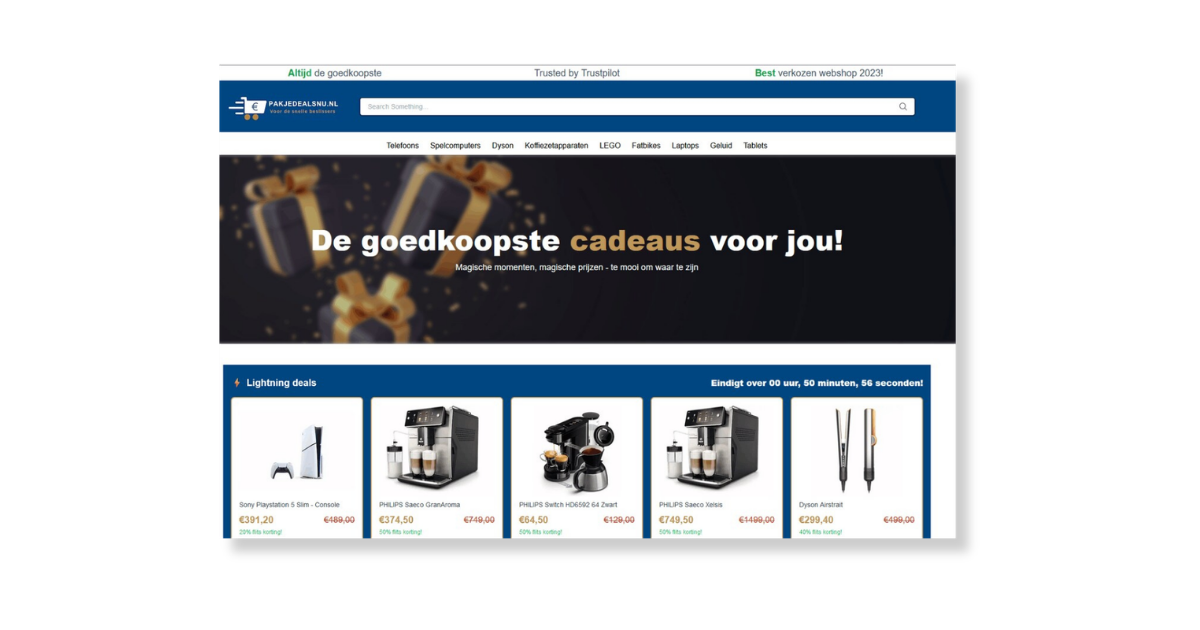
Source: HLN
Pay special attention to:
- Extremely low prices or discounts, e.g. 90% off almost everything;
- Sparse company and contact information, e.g. no physical address, only a contact form;
- The URL, e.g. domain name is full of errors, does not match the brand name, no HTTPS, etc.;
- Are the reviews trustworthy, e.g. exclusively 5 stars, hardly any reviews, or all reviews posted within a very short timeframe;
- When the website was created, e.g. claiming to be a "20-year-old company" but the website has only existed for a few months;
- Spelling mistakes.
Tip 🔦
If you notice at least 3 red flags that make you pause, trust your gut and leave the website.
Can I always trust a QR code?
Not every QR code is automatically secure. Therefore, only scan QR codes from sources you know and trust, and always check the payment information before confirming.
Tip 🔦
The Bancontact Pay app only recognizes approved QR codes from vetted partners. This makes paying much safer and reduces the risk of paying the wrong party.
Is a payment request via WhatsApp, Messenger, or SMS safe?
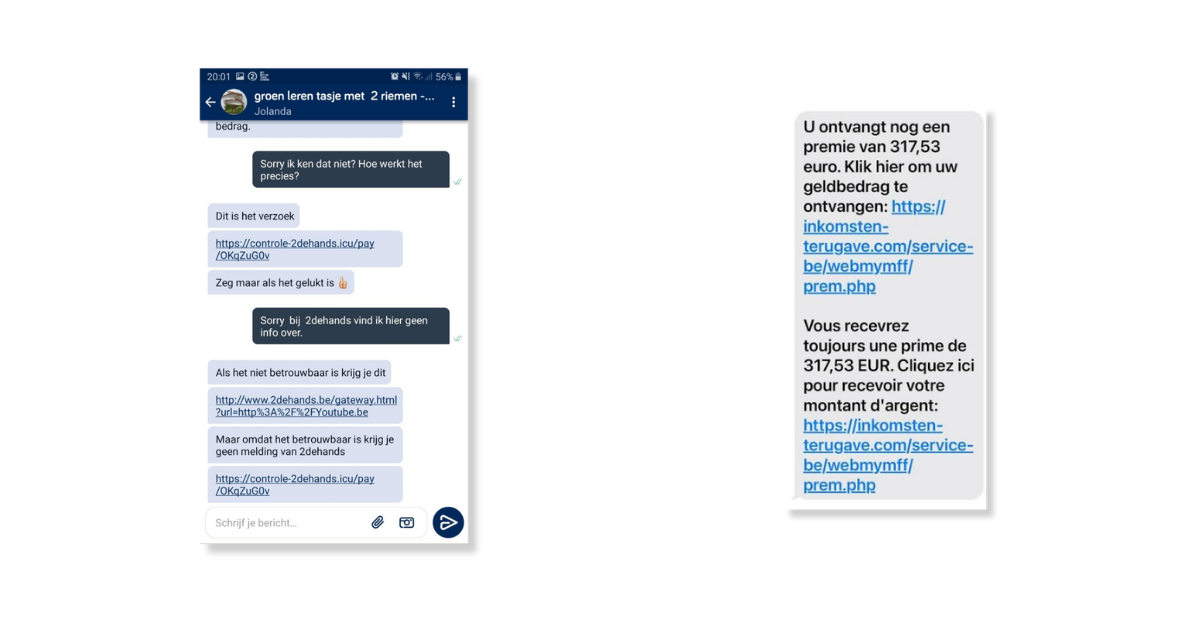
Source: Het Nieuwsblad / Safeonweb
Much fraud begins with a message. It is therefore important to be extra vigilant when receiving a payment request this way.
Pay attention to the following:
- Do you know and trust the person sending you the request? If not, ignore the message.
- When clicking, check whether your Bancontact Pay app or banking app opens. If not, close the page immediately and contact your bank.
How do I know a payment is actually going to the right person?
Always verify the recipient's name and the amount before confirming a payment.
Tip 🔦
The Bancontact Pay app always clearly displays the payment details you are confirming. Take a moment to review the information before agreeing.
Tip 🔦 🔦
Need to pay someone and have their phone number saved in your mobile? Use the 'Pay contact' option in the Bancontact Pay app to reimburse them easily and securely.
Can I cancel a payment after approving it?
An approved payment cannot simply be reversed. If in doubt, contact Card Stop and your bank as quickly as possible.
FAQ about Bancontact Pay & security
Can someone link my bank card to another Bancontact Pay account?
Fraudsters sometimes try to gain access to payment methods by taking over accounts or re-registering cards.
Through our app, you can add a bank card in 3 ways (depending on your bank): via an itsme® verification, via verification in your banking app, or via a card reader (and your PIN).
If you receive a notification in your itsme® or banking app when you haven't initiated an action, ignore the notification and contact your bank and Card Stop immediately via official channels.
How Bancontact Pay provides extra protection
A bank card can only be linked to one Bancontact Pay account. Any card you add to your app can therefore no longer be added by anyone else.
Is a QR code in Bancontact Pay safe?
Yes. When you scan a QR code with your Bancontact Pay app, you are always shown an overview of the amount to be paid and the beneficiary first. You must then confirm the payment using
Can Bancontact Pay execute a payment without my consent?
No. Every payment must be approved by you.
How Bancontact Pay provides extra protection
The Bancontact Pay app cannot withdraw money from your bank account on its own. When you want to pay for something, you must always approve the payment yourself using your PIN, fingerprint, or facial recognition. Only then does our app request your bank to transfer the funds.
Why does Bancontact Company never ask for my PIN?
We do not need your PIN or banking details to assist you. If someone claiming to be from Bancontact Pay asks for these details over the phone, hang up immediately.
How Bancontact Pay provides extra protection
Our employees never have access to your banking details or PINs. When you contact our team yourself, we only see your phone number and email address for security verification.
How does Bancontact Pay protect me against fraud?
With every payment via the app, sensitive data is protected using modern security technologies. Before a payment is processed, you are always given a clear overview showing the beneficiary's name and the amount. This allows you to verify that everything is correct before finalizing the payment.
Additionally, Bancontact Pay works closely with Belgian banks in accordance with strict security and regulatory standards.
Furthermore, all payments pass through a controlled network. This means transactions are processed within a secure infrastructure specifically designed to protect payment data and minimize the risk of abuse.
To safeguard users against emerging types of fraud, transactions are continuously monitored. Advanced systems analyse payment traffic for unusual or suspicious patterns. When a transaction appears potentially fraudulent, additional checks can be performed to ensure the safety of both the user and the payment system.
Although Bancontact Pay implements extensive security measures, the user remains a crucial link. Always double-check the recipient's name and the amount before confirming a payment to make full use of the built-in security and reduce the risk of fraud.
What if I am unsure whether a message actually comes from Bancontact Pay?
Do not respond to the message, and contact us immediately through official channels, such as our website or directly from within the Bancontact Pay app.